Small C++ Modules Are Fine
We’ve now added even more small modules for the Canvas package of our
UML editor app for Windows. The following diagram shows the packages of
our app:
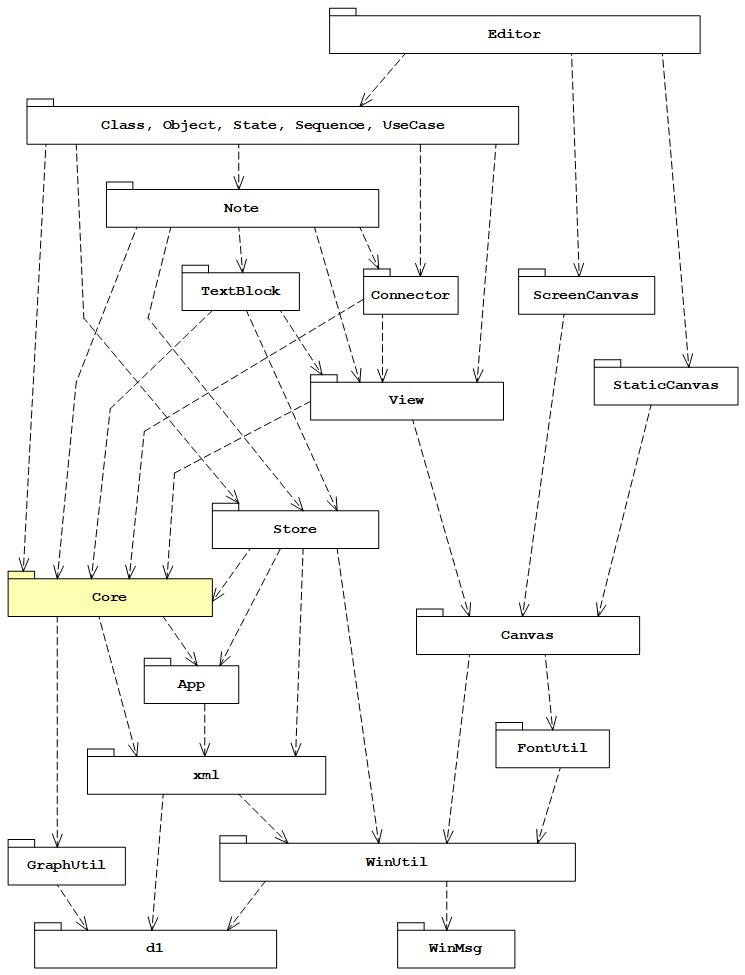
The complete source code for the Canvas package is published at
https://github.com/cadifra/cadifra/tree/2026.8/code/Canvas.
The Canvas package is a part with mostly abstract base classes used for
drawing simple objects in a
canvas,
which can be a
screen canvas,
a printer canvas or
a metafile canvas.
Windows Metafile is a graphics format used on Windows.
The C++ modules of the Canvas package with their dependencies look like this:
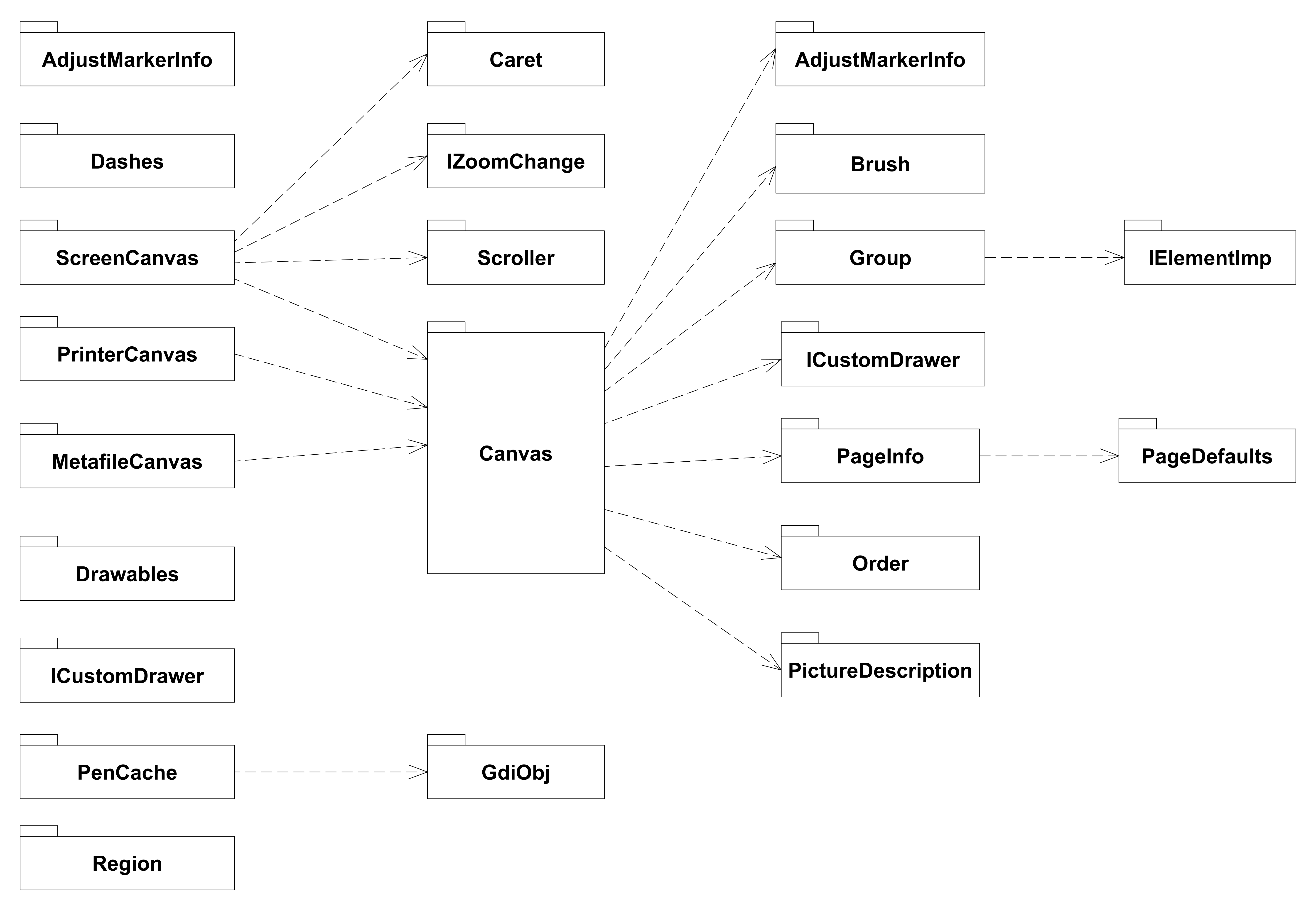
Obviously, I used our UML Editor to draw that diagram.
The names of the modules in the Canvas package all start with the prefix
"Canvas.". That prefix is omitted in the above diagram.
We’ve tried using smaller numbers of larger modules in the past, but we found no advantage when using bigger modules. The build speed for a full build roughly remains the same no matter how many modules we have (~2 minutes using the MSVC compiler with MSBuild).
Smaller modules provide the following advantages:
- The number of implementation files (
*.cpp) which need to be recompiled
if a module interface is changed, is smaller - The code is easier to navigate
- The cohesion of the types in a module is better
The main module of the Canvas package is the
Canvas.Canvas module:
export module Canvas.Canvas;

import Canvas.AdjustMarkerInfo;
import Canvas.Brush;
import Canvas.Group;
import Canvas.ICustomDrawer;
import Canvas.Order;
import Canvas.PageInfo;
import Canvas.PictureDescription;

import d1.Rect;

import std;

namespace Canvas
{

export using PolyPoints = std::vector<d1::fPoint>;

export class Canvas
{
public:
    virtual ~Canvas() = default;

    virtual void adjustMarker(Group&, const d1::fPoint& pos,
        const AdjustMarkerInfo& i, bool isTarget = true) = 0;

    virtual void line(Group&, const d1::fPoint& a, const d1::fPoint& b) = 0;

    virtual void dashedLine(Group&, const d1::fPoint& a, const d1::fPoint& b,
        bool red = false) = 0;

    virtual void alternateLine(Group&, const d1::fPoint& a,
        const d1::fPoint& b) = 0;

    virtual void ellipse(Group&, const d1::fnRect& r) = 0;

    virtual void ellipseFiller(Group&, const d1::fnRect& r, const Brush& b,
        Order order) = 0;

    virtual void dashedEllipse(Group&, const d1::fnRect& r, bool red = false) = 0;

    virtual void rect(Group&, const d1::fnRect& r) = 0;

    virtual void rectFiller(Group&, const d1::fnRect& r, const Brush& b, Order order) = 0;

    virtual void dashedRect(Group&, const d1::fnRect& r, bool red = false) = 0;

    virtual void roundRect(Group&, const d1::fnRect& r,
        const d1::float64& width, const d1::float64& height) = 0;

    virtual void roundRectFiller(Group&, const d1::fnRect& r,
        const d1::float64& width, const d1::float64& height,
        const Canvas::Brush& b, Order order) = 0;

    virtual void closedPolygon(Group&, PolyPoints& pp /* empty on return! */) = 0;

    virtual void closedPolygonFiller(Group&, PolyPoints& pp, /* empty on return! */
        const Brush& b, Order order) = 0;

    virtual void picture(Group&, const d1::fPoint& center, PictureDescription pd) = 0;

    virtual void custom(Group&, std::unique_ptr<ICustomDrawer>) = 0;

    virtual d1::fnRect getLogicBounds() = 0;

    virtual void setPageInfo(const PageInfo&) = 0;
    virtual const PageInfo& getPageInfo() const = 0;

protected:
    Canvas() = default;

    Canvas(const Canvas&) = delete;
    Canvas& operator=(const Canvas&) = delete;
};

export void addBoxAdjustMarkers(Canvas& c, Group&, const d1::fnRect& r,
    bool isTarget = true);

export void addBoxMidPointsAdjustMarkers(Canvas& c, Group&, const d1::fnRect& r,
    bool isTarget = true);

}
The Canvas class has quite a number of abstract member functions and the list of
imports in the Canvas.Canvas module is remarkable, but that list is only needed there.
Users of the Canvas package typically only need to import a handful of modules.
A typical list of imports is for example:
import Canvas.ScreenCanvas;
import Canvas.Group;
import Canvas.Scroller;
for a diagram editing task which draws something on a screen canvas.
In our experience, using small modules is not an obstacle for using the
Canvas package. It’s rather the opposite: The explicit imports make
immediately clear, what exactly is used from the Canvas package.
More specific users like the TextBlock package, which handles in-place
editing of text, for example need the following imports:
import Canvas.ScreenCanvas;
import Canvas.Group;
import Canvas.Scroller;
import Canvas.Caret;
Editing text additionally requires the
Canvas.Caret module,
which is an abstraction for the current editing position on a screen canvas.
For our UML Editor, using small modules makes a lot of sense. Trying to aggregate things into bigger modules mostly proved to be a waste of (developing) time.
In theory, using import Canvas might look like how modules are
meant to be used. But in practice, that proved to be not the best fit
for our use case.
There are no partitions in
the Canvas package. We also didn’t use the keyword sequence export import.
The Canvas.IElementImp module
is an example of a very small module:
export module Canvas.IElementImp;

import d1.Point;

namespace Canvas
{

export class IElementImp
{
public:
    virtual void move(const d1::fVector&) = 0;

    virtual ~IElementImp() = default;
};

}
It is imported in the module
Canvas.Group:
export module Canvas.Group;

import Canvas.IElementImp;

import std;

namespace Canvas
{

class GroupImp: public IElementImp
{
public:
    GroupImp() {}

    GroupImp(const GroupImp&) = delete;
    GroupImp& operator=(const GroupImp&) = delete;

    void add(const std::shared_ptr<IElementImp>& e)
    {
        elements_.push_back(e);
    }

    //-- IElementImp

    void move(const d1::fVector& v) override
    {
        for (auto& e : elements_)
            e->move(v);
    }

    //--

private:
    std::vector<std::shared_ptr<IElementImp>> elements_;
};

export class Group
{
public:
    Group() = default;

    Group(const std::shared_ptr<GroupImp>& e):
        imp_{ e } {}

    void clear()
    {
        imp_ = {};
    }

    void move(const d1::fVector& v)
    {
        if (imp_)
            imp_->move(v);
    }

    operator bool() const { return imp_.get() != 0; }

    void add(const std::shared_ptr<IElementImp>& e)
    {
        if (not imp_)
            imp_ = std::make_shared<GroupImp>();
        imp_->add(e);
    }

private:
    std::shared_ptr<GroupImp> imp_;
};

}
You might be tempted to think that having separate modules for each of these is exaggerated. But, in fact, such small modules are no problem.
It sure would be rather meaningless to have a small module A, which users
always have to import together with a module B. Then it would make sense to
merge the contents of these into a single module.
However, that’s not the case here. For example, there are are 4 module interface
units in our Cadifra app, which only import Canvas.IElementImp and there are 5
module interface units, which only import Canvas.Group. Canvas.IElementImp
is used for implementing canvas elements and Canvas.Group is used in the
Canvas.Canvas interface for grouping such elements. Destructing a
Group object removes all its visible objects from the screen canvas.
The build speed of full builds is not affected by using these small modules. It remains at ~2 minutes, no matter if we have these declarations together in bigger modules or in the current module structure.
We haven’t seen any specific relevant penalty when using such small modules.
Some of the nice benefits of modules are, that importers of an interface do not
implicitly get the imports of the imported interface. For example, importers of
Canvas.Group do not automatically get Canvas.IElementImp, which is imported
in the interface of Canvas.Group. With header files, this is not possible.
When you include a header file, you implicitly get all the declarations that
are indirectly included, which can be confusing if you change an include in
an included header: Code which previously compiled suddenly may stop
compiling. Modules provide a barrier for that. Users of a module have to
explicitly import what they need. There is no automatic implicit import of
additional things.
An excellent feature of modules is furthermore, that you can include a messy
OS API header file (like, for example, the famous <Windows.h>) in an interface of
a module and that doesn’t affect importers of the interface.
An example for this is the
Canvas.Brush module,
which has:
module;

#include <Windows.h>
#include <gdiplus.h>

#include "d1/d1assert.h"

export module Canvas.Brush;

import d1.Observer;
import d1.types;

import std;

namespace Canvas
{

export class Color
{
public:
    enum AutomaticColor;
    Color(AutomaticColor ac = WINDOWTEXT);

    Color(d1::uint8 red, d1::uint8 green, d1::uint8 blue);
    // 0 = minimum intensity, 255 = maximum intensity

    explicit Color(d1::uint32 color_bitarray);
    // bit mask for blue : 0x00FF0000
    // bit mask for green: 0x0000FF00
    // bit mask for red  : 0x000000FF
    //
    // 0 = minimum intensity, 255 = maximum intensity
    //
    // Precondition: color_bitarray & 0xFF000000 == 0

    Color(const Color& c);
    Color& operator=(const Color& c);

    bool isAutomatic() const;

    d1::uint32 getRGB() const;
    // Precondition: isAutomatic() == false;

    AutomaticColor getAutomaticColor() const;
    // Precondition: isAutomatic() == true;


    bool operator==(const Color& c) const;
    bool operator<(const Color& c) const; // allows sorting


    // predefined colors:
    const static Color Black, White, Red, Green, Blue, Yellow;

    enum AutomaticColor
    {
        ...
    };

    ...
};

const Color
    Color::Black = { 0, 0, 0 },
    Color::White = { 255, 255, 255 },
    Color::Red = { 255, 0, 0 },
    Color::Green = { 0, 255, 0 },
    Color::Blue = { 0, 0, 255 },
    Color::Yellow = { 255, 255, 0 };

export class ColorCache
{
    ...
};

export class Brush
{
    ...
};

export class BrushCache
{
    ...
};
Importers of Canvas.Brush are shielded from the <Windows.h> include. Macros
from that don’t affect importers of Canvas.Brush.
It may be tempting to design the Canvas package as a single monolithic module.
We tried that, but we see no real benefit in doing that. For our Windows app,
it is largely pointless to have a monolithic Canvas module.
We could even try to hide the internal structure of such a monolithic module
by using partitions. But that would be pointless. There’s nothing wrong
with directly exposing a set of carefully designed interface modules.
Users of the Canvas package just don’t import modules which are dedicated for
internal purposes. That happens naturally.
We love using the big std module and we exclusively import std; when we need
something from the C++ standard library. It’s very convenient and it has reduced
the time for a full build of our Windows app from ~3 to ~2 minutes, which is
quite nice. But not every module needs to be like the std module. Don’t try to
mimic std everywhere.
(last edited 2026-05-12)